

Digital Signature Suite: Facilitates electronic signatures for LogTag® Analyzer data files, ensuring integrity and authenticity.
User Authentication: Requires unique usernames and passwords for users, ensuring that only authorized personnel can access and sign data.
Audit Trails: Maintains detailed audit logs of all user activity, providing traceability and accountability.
Permanent Signatures: Once applied, digital signatures cannot be removed, preserving the integrity of the data file.
Multiple Signatures: Supports the attachment of multiple signatures for different approval stages, enhancing the approval process.
Regulatory Alignment: Designed specifically to adhere to FDA regulations governing electronic records and signatures, ensuring compliance in regulated environments.
LogTag® Digital Signatures Suite
The LogTag® Digital Signatures Suite provides a secure and efficient solution for digitally signing LogTag® data files. This ensures fast information exchange, better data integration, and improved product quality.
Each digitally signed LogTag® data file contains:
Once applied, signatures are permanent and cannot be removed.
The suite fully supports FDA 21 CFR Part 11 standards, ensuring regulatory compliance for digital signatures and user authentication.
The LogTag® Digital Signatures support suite of software facilitates the digital signing of LogTag® data files. The benefits of digital record keeping are significant. It increases the speed of information exchange and advanced searching capabilities, reduces the cost of storage space, increases data integration and trending information and improves product quality and consistency.
Adding digital signatures to recordings is a logical next step, reducing vulnerability of signature fraud, report misfiling and allows traceability of approvals by providing detailed audit logs.
Data recorded and downloaded from LogTag® can be digitally signed using the LogTag® Digital Signatures suite. Each signature contains information that clearly indicates:
Digital signatures remain permanently stored with the LogTag® data file and cannot be removed once applied. Multiple signatures with different meanings can be attached to the data file, allowing multiple stages in an approval process to be captured. Authenticated users are identified by unique usernames and passwords.
The LogTag® Digital Signatures Suite has been specifically designed to support FDA title 21 CFR Part 11, which regulates the use of digital signatures, the user authentication requirements and how users can digitally sign a set of recordings with an allocated set of signatures.
The document about FDA compliance is available for download here and explains how compliance with this regulation is achieved.
You can also get more information about the FDA title 21 CFR Part 11 regulations at https://www.fda.gov.
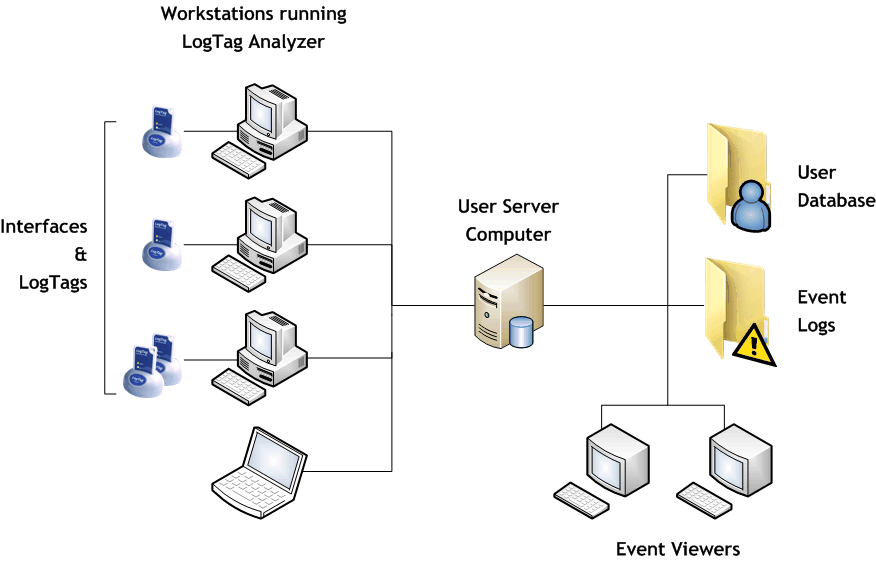
The client software is LogTag® Analyzer.
This is the standard software for reading and configuring LogTag® loggers and runs on computers that are reading, displaying and storing recorded data.
The server software is LogTag User Server.
User Server typically runs on a server station in a networked computer system but can also operate on the same computer as LogTag® Analyzer provided security issues are observed.
Once the client software is configured to connect to User Server it can only be operated when valid logon data are provided. The User Server software facilitates this logon process and provides access to the user & signature database to all appropriately configured LogTag® Analyzer clients. Once a user is logged in, all activity is tracked by the User Server and an Audit Log is maintained of selected user activity. The user can then attach allocated signatures to data files.
The LogTag® Event Viewer allows displaying of the audit events and can be run on the same computer as User Server and/or other workstations provided those workstations have network access to the folders on the computer where the event audit log files are stored.
We use cookies to improve your experience on our site. By using our site, you consent to cookies.
Manage your cookie preferences below:
Essential cookies enable basic functions and are necessary for the proper function of the website.